
The Philadelphia Inquirer
The Philadelphia Inquirer, LLCNews & Magazines
4.3419.00 Reviews
- Version
- 28.4
- Installs
- 50.00K
- Age Rating
- Everyone 10+
Screenshots


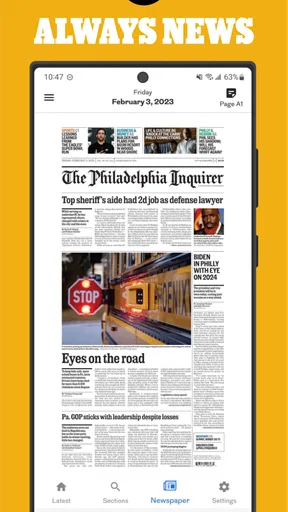

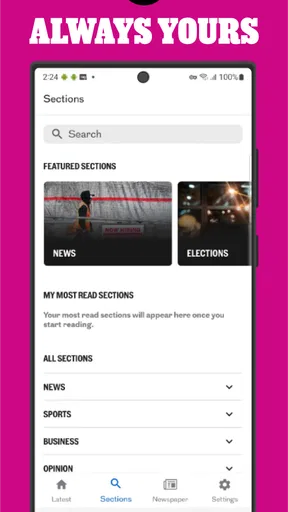


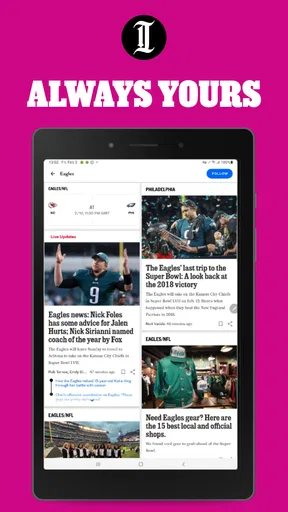
Our Review of The Philadelphia Inquirer
 Analysis by Appyee
In a household where one person follows City Hall and another checks the Phillies, a local news app can be useful without everyone having to agree on what counts as a must-read. I see The Philadelphia Inquirer as most valuable when Philadelphia itself is the shared point of interest: residents can check the same local headlines, while relatives elsewhere can keep up with a city they still care about. The key is to treat it as a source to consult, not a common family account that should automatically suit every reader.
A Practical Place for Philadelphia News
That local focus makes the app a different choice from a broad news aggregator. Aggregators can pull together headlines from many publishers, which is handy for comparing coverage across subjects. This app is better suited to readers who want one publication’s view of Philadelphia news and prefer not to sift through a general national feed to find it. If your main interest is news from somewhere else, a local outlet for that place will probably serve you better.
The Philadelphia Inquirer, LLC develops this free news and magazines app. It has a 4.2 average from around 1,100 ratings, and it has been available since November 19, 2010. Its current version is 28.1, with Android support starting at 8.0. Those details make it easy to identify the established publication and app, but they don’t tell you whether its local mix will match your interests; that is best judged by the stories you actually choose to read.
One Household, Different Reading Habits
A realistic use case is a couple getting ready for work: one person checks the morning’s local headlines, while the other looks for sports or community coverage before leaving. On a shared tablet, the straightforward layout can make it easy to pass the device along and browse without learning a complicated interface. On a personal phone, readers can make their own choices about what to open and which alerts they want to receive.
I would avoid assuming that a shared device means a shared news experience. A person’s preferred sections, reading history, or alert choices may not suit everyone who picks up the tablet. A practical household routine is to keep notifications limited to the person who wants them, then let other readers open the app when they choose. That prevents one person’s interest in breaking updates from setting the pace for the whole room.
Keep Setup and Accounts Personal
Before making it a household default, I’d check who is signed in and who controls any purchase decisions. The app is free to install, but in-app purchases range from $0.99 to $27.99 per item, so “free” does not mean every possible part of the experience has no cost. If children or guests use the same device, agree in advance that they should ask before making a purchase. This is ordinary shared-device caution, not a claim that the app provides family controls.
For a family member who only wants occasional headlines, starting with the free app and browsing together is a sensible way to see whether it earns a regular place on the device. Someone who reads frequently should consider the purchase choices shown in the app before committing. I would not buy anything simply because another person in the household has installed it; each reader should understand what they are selecting and what it costs.
Coordination Without Turning News Into Noise
Push alerts are useful when a reader wants a prompt about breaking news, but they can become disruptive if several people expect the same phone to serve different routines. Decide whose device should receive them and keep the rest of the household’s browsing on demand. If you are discussing a story at dinner, sharing its subject or headline is often more useful than forwarding every notification that appears during the day.
One small workflow I find helpful is to separate checking from reacting: scan headlines at a chosen time, open only the stories that affect your day, and leave less urgent reading for later. The app’s described offline reading option also suits a commute with unreliable reception: save material while connected, then open it during the journey. I would make that a before-you-leave habit rather than waiting until you are already underground and unable to load something new.
Local Depth, With Limits
The publication’s Philadelphia emphasis is its clearest strength. People who live in the area can use it to follow local developments; former residents can keep a connection with the city; and visitors can check what is happening beyond the places they plan to see. The app also presents national coverage, which can provide context, but I would still turn to a broader news service when I want a wide range of national or international perspectives in one place.
For a reader who wants a single stream of headlines from many publishers, an aggregator is likely more convenient. For someone who wants a local paper’s reporting and editorial voice, a publication-specific app is a more direct fit. The trade-off is that you are choosing the Inquirer’s selection and presentation rather than comparing many outlets automatically. I’d use it alongside another source when a developing story is consequential, not assume one app represents every angle.
The app’s reported audience is over 50,000 installs, and its content rating is Everyone 10+. That age label is a useful starting point for a household decision, not a replacement for a parent or caregiver checking the actual articles. News can cover difficult subjects, and what feels suitable depends on a child’s age and the story of the day. I would browse with younger readers and talk through sensitive coverage rather than treating the rating as a promise that every headline will be comfortable for them.
Design and Usability
The first thing I noticed when I opened the app was its clean and intuitive design. The layout is super user-friendly, which means even if you’re not a tech wizard, you’ll find your way around without any fuss. The navigation is smooth, and articles load quickly, which is crucial when you're trying to catch up on the go.
The home screen is straightforward, presenting a mix of headlines and featured stories. You can scroll through different sections like news, sports, entertainment, and more. I love how everything is neatly categorized, making it easy to find exactly what you’re looking for.
Content Richness
Now, onto the juicy stuff—content. The app offers a wide array of articles ranging from breaking news to in-depth analyses. What I particularly appreciate is the balance of local and national news coverage. It gives you a comprehensive view of what's happening around you and beyond.
If you're someone who likes to dive deep into stories, you’ll enjoy the investigative pieces and editorials. They provide a nuanced perspective on current issues, something that’s increasingly rare in today’s fast-paced news environment.
Features That Stand Out
- Personalization: You can customize your news feed based on your interests. Whether you’re into sports, politics, or lifestyle stories, the app tailors content to suit your preferences.
- Notifications: Stay in the loop with push notifications for breaking news. You can adjust these settings to ensure you’re only alerted about topics that matter to you.
- Offline Mode: This feature is a lifesaver for those times when you’re underground on the subway or in areas with spotty internet access. You can save articles to read later without needing a connection.
Room for Improvement
While the app is pretty solid, it’s not without its quirks. I found that sometimes the app can be a bit sluggish when loading multimedia-heavy articles. It’s not a huge deal, but it’s something to be aware of, especially if you’re in a hurry.
Additionally, while the ads are not overly intrusive, they can occasionally disrupt the reading experience. A subscription option to remove these ads would be a welcome addition for those who prefer an uninterrupted browsing experience.
Conclusion
All in all, The Philadelphia Inquirer app is a fantastic tool for keeping up with the news, especially if you’re living in or interested in the Philadelphia area. Its user-friendly interface, robust content selection, and convenient features make it a top choice for anyone wanting to stay informed.
So, if you haven’t downloaded it yet, what are you waiting for? Give it a spin and see how it becomes your go-to source for news. Trust me, you won’t regret it!
Who I’d Recommend It To
I’d recommend trying it if Philadelphia is part of your daily life, your family, or your interests, and you want a publication centered on the city rather than a feed assembled from outlets everywhere. It is also a reasonable option for a household with mixed interests, because readers can choose among news, sports, and other sections instead of following one identical stream.
I’d skip it as a primary source if you rarely need Philadelphia coverage, want a neutral-looking collection of multiple publishers, or are trying to avoid ads and possible purchase decisions. For those readers, a general news app or a publication focused on their own region may be a better first install. The Inquirer is most convincing when its local reporting is the reason you opened it in the first place.
My Household Verdict
For shared use, I’d put it on a household tablet only if everyone understands that it is a publication-specific news app, not a universal family dashboard. Keep purchase decisions with an adult, choose carefully whose phone receives alerts, and let younger readers browse with age-appropriate guidance. Those simple boundaries make the app easier to use together without pretending it can manage family accounts or reading rules for you.
My overall take is that this is a useful, focused way to follow Philadelphia, with practical browsing options and enough variety for readers who care about the city. Its local focus is also its main limitation: it cannot replace a broader source for readers whose interests extend well beyond the region. If your household has a genuine Philadelphia connection, I’d give it a place in your news routine; if not, I’d choose an app that better matches the place and range of coverage you actually need.
Verdict
Strengths of The Philadelphia Inquirer
- Comprehensive news coverage.
- User-friendly interface.
- Real-time updates.
- Customizable notifications.
- Offline reading available.
Limitations of The Philadelphia Inquirer
- Frequent ad interruptions.
- Limited free content access.
- Occasional app crashes.
- Slow load times at peak hours.
- Subscription required for full access.
Similar Picks in This Category
View All
Google News - Daily Headlines
Google LLC4.0

X
X Corp.4.8

Flipboard:Your Social Magazine
Flipboard3.4

Opera News: breaking & local
Opera4.5

Hindi News by Dainik Bhaskar
Dainik Bhaskar Group4.0

Way2News Daily News App
Way2News ( Formerly Way2SMS )4.6
Frequently Asked Questions
What is The Philadelphia Inquirer app and what features does it offer?
The Philadelphia Inquirer app provides users with comprehensive news coverage from Philadelphia and the surrounding areas. Features include live updates, breaking news alerts, in-depth articles, and multimedia content such as photos and videos. The app also offers customization options for news alerts and access to premium content for subscribers.
Is there a cost associated with using The Philadelphia Inquirer app?
The Philadelphia Inquirer app is free to download, offering some content at no charge. However, access to premium articles and additional features may require a subscription. There are various subscription plans available, allowing users to choose the option that best suits their needs. Details about pricing and subscription benefits can be found within the app.
Can I customize notifications and alerts in The Philadelphia Inquirer app?
Yes, the app allows users to customize their notifications and alerts based on their interests. Users can select specific topics, such as local news, sports, or entertainment, to receive timely updates. This feature ensures that users stay informed about the news that matters most to them without being overwhelmed by unnecessary alerts.
Is The Philadelphia Inquirer app available for both Android and iOS devices?
The Philadelphia Inquirer app is available for both Android and iOS devices, ensuring accessibility to a wide range of users. It can be downloaded from the Google Play Store for Android devices and the Apple App Store for iOS devices. The app is designed to provide an optimal experience on both platforms.
How is user privacy handled in The Philadelphia Inquirer app?
The Philadelphia Inquirer app is committed to protecting user privacy. It collects data necessary to enhance user experience, such as preferences and usage patterns, but adheres to strict privacy policies. Users can review these policies within the app to understand what data is collected and how it is used. Additionally, users have options to manage their privacy settings directly in the app.
